Berikut ini adalah tutorial cara membuat atau memodifikasi huruf "C" menjadi bentuk 3d,
kamu dapat membuat huruf lainnya seperti ABDEFGHIJKLMNOPQRSTUVWXYZ,
silahakan anda tuangkan ide anda sendiri kedalam huruf2 tersebutm jangan hanya berfokus pada contoh tutorial yang saya buat, anda dapat menirukan seperti setiap lekukan pada 3d tersebut.
untuk milihat tutorial tersebut, anda dapat menonton pada video tutorial saya dibawah ini.
Creating vector portraits is very easy to the already proficient.
but, for beginners it is so hard to make it, but if you have an earnest intentions and want to be better, surely it'll be perfect.
here I'll give you a little simple ways to create vector portraits, in an easy way and a slow speed. Please watch the video below. get your skintone colornya below. If you want to file the Ai/eps please you get below as well.
So today I'm going to show you how to create a vector portraits , which are very simple , using the software Adobe Illustrator CC.2015 , just a few layers path / layer , and also the color of the skin and the clothes were very charming , you can try at home , please start by following this tutorial a bit , my advice is do not get too focused on my tutorials , try to imagine yourself , in essence it is a simple job , but you will have a lot of creative ideas if you master it. I hope you enjoyed this tutorial .
Want to support my channel? I don't accept donations, but if you feel compelled to support my work here on Youtube in any way then a one-time purchase of my $15 online course outlining how to design a logo from start to finish would be greatly appreciated, and you may learn a thing or two about logo design as well. You can check it out here Watch Video. Tutorials.
Graphic Design - Adobe Illustrator/Photoshop - Drop
In this Video we will be working on a graphic design with very unique style. We got a Case Iphone, Using Rectangle, there is a uniquely designed shape folded over it. To create this , we will follow very simple steps.
Using only the basic tools, we got this drop design.
In this tutorial , I will be tracing a long-haired woman , with a vector style simple , less complicated , a little color too sharp .
From here you can take a lesson on the various style vector portraits ,
you can make your photos like this ,
if you want to emulate make them like this ,
I provide stock image below this article .
good luck.
Saat pertama kali kita coba cari vector, eh,, yang tampil pasti formatnya Ai / .eps, sedangkan kamu hanya menguasai satu software saja, yaitu Adobe Photoshop, bagaimana kamu bisa membuka file ai di photosop, jawabanya jelas tidak bisa, itu harus di convert terlebih dahulu,
dari sini lah banyak yang bertanya kepada saya, Mas ,, bagaimana caranya untuk convert Ai ke PSD, dan saya mencoba untuk mencarinya dengan cara mengotak atik file tersebut di Ai, bisa dengan (CTRL+C) lalu buka photosop dan buka new page, terus di paste (CTRL+V) di lembar kerja photosop, emang bisa sih,, tapi layernya tidak bisa dipisahkan, lalu saya terus mencoba mengotak atik, bagaimana sih caranya,,
sampai saatnya saya menemukan sebuah trik dengan cara saya sendiri, tanpa melihat google ataupun guru,
ya itu berawal dari insting saya sendiri, cara silahkan kalian baca dengan seksama thread dibawah ini,
kalo bisa sambil dipraktekan, biar tidak lupa, saya akan menggunakan contoh image dibawah ini,
Gambar diatas adalah gambar yang saya download dari stockimage, (udah saya ganti dikit text nya. hehe) , jika kamu ingin download dimana cari file yang format eps, kamu bisa pergi ke Allfreedownload atau Vecteezy, dan masih banyak lagi,
Ok, saya akan mengolah gambar diatas dengan menjadi format PSD, cekidot..
Emang bisa ya convert file Ai ke PSD file ???
Yah,, kamu tidak salah baca. Convert File ke PSD dari Ai, itu memang sangat bisa...
silahkan kamu ikuti tutorial ini mudah koq, tinggal klik klik aja,, apalagi jika sudah menguasai software diluar kepala,
Untuk langkah awal,
1. kamu bisa buka software Adobe Illustrator kamu,
2. Open File yang akan kamu convert menjadi psd
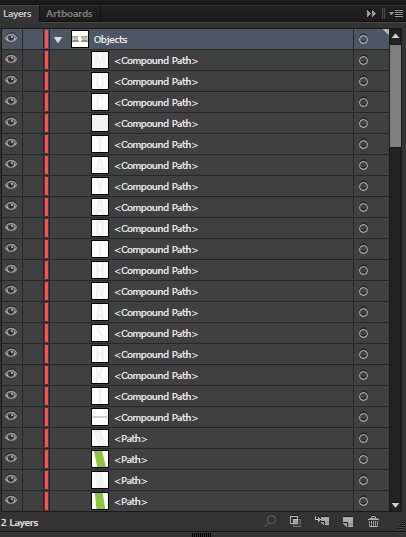
3. setelah dibuka, silahkan kamu ungroup file tersebut menjadi beberapa Path,
4. klik satu persatu setiap path, kemudian tekan CTRL+G per Path. (ubah path menjadi
group)
ini contoh gambar sebelum di GROUP
ini contoh gambar setelah di GROUP
5. jika semua sudah selesai di ubah menjadi group, silahkan kamu simpan dengan cara :
Klik File - Export - save menjadi PSD
6. Kemudian Langkah ke enam silahkan buka Software Adobe Photoshop kamu, kemudian klik open (buka file hasil export tadi).
7. Dan lihat hasilnya pada Tiap Layer pada Photoshop kamu,
Bagaimana ?? mudahkan,, jika kamu masih kebingungan, kamu bisa tonton video berikut ini,
Jika kamu merasa video ini telah memabntu anda, silahkan like dan bagikan, jangan lupa untuk subscribe, untuk update video dan tutorials terbaru,
terima kasih,